




What Is a LinkedIn Comments Strategy?
A LinkedIn comments strategy is a planned routine for commenting on other people’s posts to reach your buyers. You keep a fixed list of creators your ICP reads, comment on a set number of posts daily, then route the profile visits into conversations. The comment is the outreach. The post is the room it happens in.
Three things have to work together. First, a short list of threads you actually watch. Second, a few comment shapes that earn replies. Third, a follow-up path from public reply to private conversation. Remove any one and the system stalls. A list without comment shapes produces “Great post.” Comment shapes without a list scatter your effort across strangers. Both without follow-up produce visibility and no pipeline.
Sources: DemandSage, LinkedIn Statistics 2026, and Zoomsphere, LinkedIn Algorithm 2026.
Read those numbers together and the choice gets obvious. A company page fights 71 million other pages for attention. A person leaving a useful comment borrows an audience someone else already earned. Your buyers are in those threads to think, not to be sold to.
Why Comments Beat Posts for Pipeline
Ask most B2B marketers how they use LinkedIn and you’ll hear the same answer. “I post content.” Push further, ask about comments, and you’ll get a shrug. Maybe they drop a “Great post!” on a colleague’s update, or they stay silent entirely.
The people who publish every week are a small minority of the platform, and everyone else scrolls, reads, and reacts. Your ideal buyers sit in that larger group, and the comments they leave on posts from peers and competitors are the closest thing LinkedIn has to live buying signals.
Strategic commenting is about showing up where your buyers already are and making it easy to find you when they’re ready. For the foundation, see our pipeline-generating profile guide.
Visibility without the treadmill. A comment on a popular post sits in front of that post’s whole audience. When a VP of Sales with 15,000 followers writes about a pipeline problem, your useful reply puts your name and headline in front of thousands, which is earned distribution with no production attached.
Context comes pre-built. A comment on a demand generation post inherits the problem. You go straight to the specific thing you’d do, which is what buyers want from a stranger.
The ranking system rewards conversation. LinkedIn’s own guidance on feed ranking treats real comments as a stronger signal than reactions. Thirty comments reach further than two hundred likes. When your comment starts a discussion, the system extends the thread around your contribution.

What 15 Minutes a Day Actually Returns
Commenting gets dismissed as soft because nobody runs the arithmetic. The assumptions below are conservative, so swap in your own numbers before you take them to a CFO.
| Step | Assumption | Monthly output |
|---|---|---|
| Comments left | 6 per weekday on posts averaging 2,000 impressions | 120 comments, roughly 240,000 thread impressions |
| Profile visits | 1% of thread impressions check who you are | 2,400 profile views |
| Connection requests | 5% of visitors send or accept one | 120 new first-degree contacts |
| Conversations | 20% of new connections reply to a follow-up | 24 live conversations |
| Qualified opportunities | 10% of conversations match your ICP | 2 to 3 opportunities |
Two or three qualified conversations a month is a modest number, and it compounds as the creators you comment on start recognizing you. The table also shows where the plan breaks, which is the useful part. Generic comments collapse the profile-visit rate, and every downstream row goes with it. Skipping the follow-up means the conversations never start. The row that drops is your repair list.
The Three-Comment Framework
Not all comments are equal, and “Great post!” does nothing for your pipeline. “Interesting perspective” is barely better. Strategic commenting requires intention, and there are exactly three types of comments worth leaving.
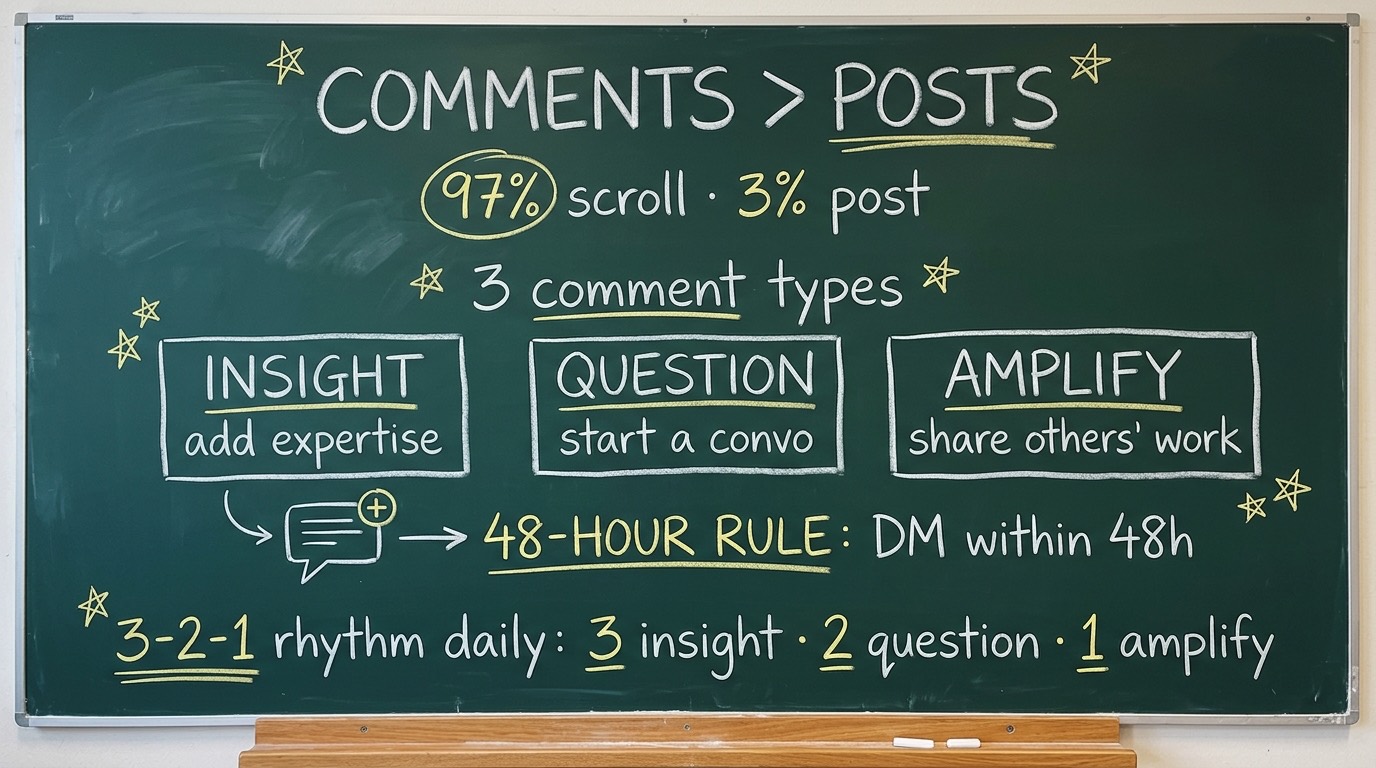
The Insight Comment carries your reputation and shows competence without self-promotion. The rule: don’t agree, extend. A marketer who reads your insight and thinks “this person has done the work” is a marketer who clicks your profile.
The Question Comment starts a discussion, so good questions are specific enough to prove you read the post and open enough that the author wants to answer. When they do, their audience watches the exchange.
The Amplify Comment builds reciprocity faster than anything else on the platform. Promote someone’s work with a specific note about why it mattered, and they remember you. The next time you reach out, you aren’t a stranger.
How to Find the Right Conversations
You can’t comment strategically if you never see the strategic threads. Most people scroll and hope something worth engaging appears. That’s passive, and it produces the same three posts everyone else already commented on, so build a source list instead.
This is separate from which content formats work on LinkedIn. Formats decide what you publish. Sources decide where you show up.
-
1Build Your ICP Creator ListIdentify 15 to 20 creators whose content your ideal buyers read. These are usually practitioners your ICP already follows, not competitors. Turn on post notifications for each account. This list replaces the algorithmic feed.
-
2Monitor Three to Five ICP HashtagsTags like #demandgeneration, #b2bmarketing, and #salesstrategy surface posts from people you don’t follow yet. Spend five minutes a day on the top posts in your ICP’s tags. Engagement there shows what buyers care about this week.
-
3Follow the Commenters, Not Just the CreatorsWhen a comment on a relevant post is sharp, click through to that person. They are likely in your ICP, because they discuss the exact problems you solve. Follow them. Their posts become new surfaces, and their comments show you what language resonates.
-
4Save High-Engagement Threads for LaterNot every post deserves an instant reply. When a thread already has a real discussion and the topic sits inside your expertise, save it. Return during your commenting block and add a comment that stands out.
From Comment to Conversation
This is where most people lose the pipeline. They leave a good comment, someone engages, and then nothing happens. A comment without a follow-up is a handshake without a name.
Moving from public comment to private conversation is the most important skill here, and people fumble it by jumping from “great post” to a calendar link in one step. That kills trust instantly.
The 48-hour rule. If someone engages with your comment, replies to it, or views your profile afterward, you have a 48-hour window to send a request or a message. After that the context fades.
The value-first message. Reference the specific thread. Don’t pitch. Something like this works:
Hey [Name], I appreciated your take on [topic] in [Creator]'s post. The point about [specific detail] made me rethink how we handle [related challenge]. Would like to follow your work here.That message references the exact conversation, proves you paid attention, and asks for nothing. The goal of the first message is a connection, because pipeline comes from relationships that start with low-pressure contact.
When to pitch. Wait for a signal. If they ask about your work, you’ve got an opening. If they describe a problem you solve, offer to share how you handled it. If replies stay short and polite, stop pushing.
Your profile does the selling in that window, so treat it as a landing page. Our guide to the LinkedIn profile picture and HDR setup covers the first thing every visitor sees.
Scaling Without Becoming a Bot
The goal is consistency, not volume. Fifteen minutes of real commenting beats three hours of scrolling. Make it a habit without becoming a comment-spamming robot.
Build a swipe file. Keep a document of your best comments, the ones that got replies or led to requests. These are starting points, not templates. Check the file for the tone that worked, then write fresh for the post in front of you. The structure repeats. The words don’t.
Time-block it. The biggest killer of a commenting habit is “I’ll do it when I have time.” You won’t. Put fifteen minutes on the calendar at the same time daily. Morning works because creators publish then and threads are fresh. If the block keeps getting moved, Reclaim.ai defends it as fixed time and schedules the flexible work around it.
When You Comment Matters as Much as What
Timing decides how many people see your comment. The same comment posted at the right hour reaches several times the audience.
| Window | What is happening | What to do |
|---|---|---|
| 0 to 60 minutes | The author is still in the thread and early replies earn the most response | Comment on the two or three posts you have notifications for |
| 1 to 6 hours | Distribution is still being decided and the thread is active | Join threads with five or more real comments and add a new angle |
| 6 to 24 hours | Reach is mostly set, but competition for attention is low | Use this window for questions the author will answer later |
| 24 hours and beyond | Reach is gone, relationship value remains | Skip unless the topic is evergreen and the author is a target contact |
Notification-driven commenting is the only reliable way to hit that first hour, which is why the creator list matters more than any other part of setup. If you’re scrolling, you’re already late.
Three Numbers That Tell You It Is Working
You don’t need a CRM. You’ll need three numbers checked weekly, plus a sheet logging date, post, comment type, and outcome.
Profile views. This is the direct result of a comment landing. If the number doesn’t move after two weeks, the comments are too generic or you’re in the wrong threads.
Connection acceptance rate. If requests tied to a thread get accepted often, your comment is working as a warm introduction. If they get ignored, the request arrives too cold or too late.
Conversations started. Count replies that go past one exchange. This is the number that becomes pipeline, and the one to report upward. For a fuller look at why last-click reporting hides this work, read our piece on content attribution.
After thirty days you’ll see patterns. Certain creators’ audiences respond and certain comment types drive profile visits, so feed those patterns back into the list. That compounding loop is the same one behind a content engineering feedback loop, applied to conversations.
Start Tomorrow Morning
You don’t need new tools, a content calendar, or a budget conversation. You’ll need fifteen minutes, a list of fifteen creators, and a commitment to comments that say something.
Your next customers are in the threads underneath those posts, wondering whether anyone else has the same problem. Show up with a useful insight, a sharp question, or a genuine amplification. Do it daily for thirty days, then look at your inbound.
FAQ: LinkedIn Comments and Pipeline
How many LinkedIn comments should I leave per day?
The 3-2-1 rhythm totals six comments a day: three insights, two questions, one amplification. If you’re starting out, three to five quality comments beat ten generic ones.
Do LinkedIn comments actually generate leads?
They generate the step before leads. A comment that earns a profile visit creates a warm contact you can follow up with inside 48 hours. Leads come from that follow-up.
Should commenting replace posting?
No. Comments capture signals fast, and they work best inside a broader LinkedIn demand engine that also includes publishing and distribution. Drop posting and your visitors land on a stale profile.
What should I do after someone replies to my comment?
Reply once more in the thread, then visit their profile and send a request within 48 hours. Reference the exchange. Don’t send a calendar link on the first message.
Can commenting get your account restricted?
Repetitive or promotional comments can. LinkedIn’s Professional Community Policies prohibit spam and repetitive outreach. Avoid copy-paste comments, identical messages, and comments that open with a pitch.